Tuesday, October 3, 2017

BizTalk 2016 - WCF-Custom Transport: Unrecognized attribute 'ApplicationName'

Today I came across an error with the WCF-Custom Transport.

I have a send port that uses the WCF-Custom/sqlBinding type as a send port on my local dev machine.  Everything works as expected, so I exported the MSI and bindings to use on our Test environment.


When I imported the bindings file, I received an error: "Error loading properties. (System.Configuration.ConfigurationErrorsException) Unrecognized attribute 'ApplicationName'.

I compared the settings on my local dev to the Test environment and noticed some differences.  This screenshot is from our Test environment


and this is from my local dev environment


Notice the highlighted configurations don't exist in the other one.

This is because I have installed BizTalk 2016 Feature Pack 1 on my local machine, and the Test machine does not have this installed.


Thursday, August 17, 2017

Cannot delete a send handler that is used by a send port

We had a mislabeled Host/Host Instance name in one of our lower environments - it wasn't the same name as our production or qa environments, and a request was sent to rename it. So, a colleague performed the following:

  1. Create a new Host and Host Instance with the desired name.  
  2. Once that was done, add the Host to the appropriate adapter. For us it was adding it to the FILE adapter.
  3. Then re-configure all appropriate send ports to use the new Host Instance.

Restart Host Instances, and the send ports were properly using the newly created Hosts.

Once that was done, the thought was that the old host could be deleted. We came across a few things (some are obvious, others aren't so):

  1. You need to remove the Host Name from all adapters using the (old) Host you wish to remove:

At this point, an error popped up - "Cannot delete a send handler that is used by a send port":


The issue is that, although all the static send ports were updated to use the new Handler, the dynamic send ports weren't - this isn't as obvious. Here's how to do that:
  1. In the BizTalk Admin Console, select Applications/All Artifacts/Send Ports
  2. Sort by Transport Type. Here is where you will see some that don't have the Transport Type as blank. These are your Dynamic Ports.
  3. For each Dynamic Port, open one up and, in the General tab, select 'Configure'.
  4. You will see a list of Send Handlers associated to each Adapter. You will need to make your changes in this list according to how you made your changes with your static Ports.


Once these changes are made throughout, you should be able to now remove the Handler completely, and thereby able to remove Host Instances, then the Host itself.

Further explanation here by the-one-and-only Saravana Kumar:

The "Behind the Scene" section was the eureka! moment for me. 


FYI - This was tested in BizTalk 2016.  I don't believe you can navigate the same way in BizTalk 2010.

Tuesday, May 23, 2017

TFS Build Error - works in Command Prompt, doesn't work in TFS Build Definition

I've been getting into TFS Builds lately (using VNext, Wix, etc - not XAML).  In particular, I'm using TFS 2015, which I installed to a local VM.

I was able to successfully build a project off a DOS prompt (it's now called the "Developer Command Prompt" in more modern Windows Servers... ☺) using the MSBuild.exe command.  However I was not able to get a successful build when using the MSBuild step.  I even went a little further and decided to use the Command Line step in the definition and typed in the exact same command line that I used off the dos prompt above.  Even that didn't work.

The errors I kept on seeing in the log files were ambiguous to me - a whole bunch of ICE and LGHT errors.  Almost all of them referred to an "incorrectly registered scripting engine":


The errors didn't make much sense to me.  So instead of getting too focused on the error messages, I took a step back and reviewed what is going on: I was using the same exact command line - one using via the local server Command Prompt (success), and the other being called within TFS Build Command Line step (fail).


Conclusion:  permissions


I talked with a co-worker about this (he is a bit more seasoned with TFS Builds) and one of the first question he asked was: "How is your Agent set up?"

Looking at a few things we (he) figured it out.  My settings.json file in the appropriate agent folder was not properly set up.  In particular, the "WindowsServiceName" setting was blank.  I *think* that if it's blank, it uses 'Local Service' or something like that.  Either way, it's not a best practice.

I reconfigured the agent to use the appropriate service.  I reviewed the updated configuration to make sure that the setting was now populated.  After that my MSBuild step was running without a hitch.


Wednesday, April 20, 2016

Side by side SQL versions, Entity Framework, and SQL Aliases

My laptop has both SQL Server 2008 and SQL Server 2012 installed for development purposes.  The SQL Server 2008 is at the root instance (local) and the 2012 version is installed has its own instance (local)\SQL2012.

I have been developing an application which has an app.config file with a SQL Server connection string (code first Entity Framework).  Since the solution I'm working on it in source control (TFS), it's shared; so I decided to make an alias for use in the connection string.  That way, others developing on this project can use their own local database without changing the configuration file (and then checking their connection string changes back in and irritating the rest of the dev group).  The alias that I created for my local laptop points to the SQL 2012 instance.

I opened up SQL Server Configuration Manager and created an alias to my 2012 instance (.\SQL2012).  However, when the update-database command is executed, the database was deployed to the root instance (SQL 2008), and not the 2012 instance that I wanted it deployed to (as identified in my SQL Alias).  I restarted the SQL Server service, but still got the same result when I called the update-database command again.

What I didn't realized is that I was using the SQL Server 2008 version of SQL Server Configuration Manager, not the 2012 version.  The 2008 version won't show the 2012 services but 2012 version will show all services.

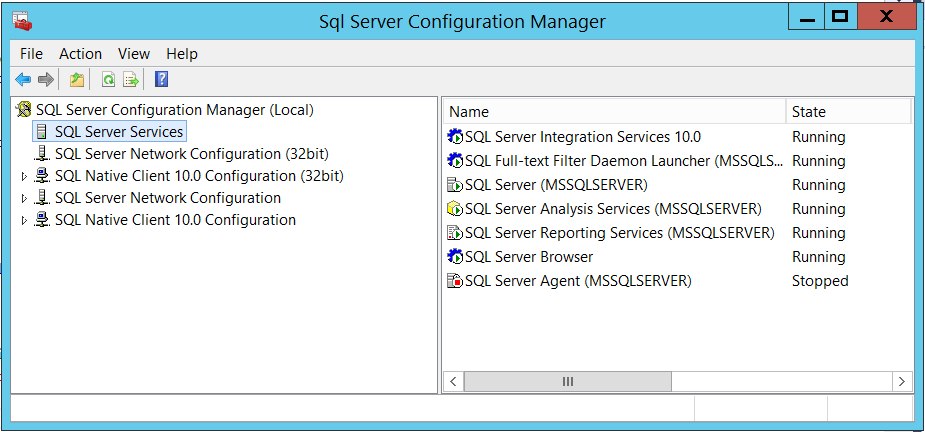
To better explain, this screenshot is what I see when I run the 2008 version:

and this is the screenshot from the 2012 version:


Notice that 2012 version displays the SQL Server 2012 instance of the services.  Because I was using the 2008 version of the Configuration manager, I was unknowingly restarting the root server (2008) service, not the 2012 service.

After I restarted the 2012 instance, all worked just fine.

As far as Entity Framework is concerned, it seems to me that should expect an error that an instance can't be found when using the update-datebase command.  It would have been nice to see an error at a minimum (i.e. "Cannot find SQL instance, defaulting to root").

See https://msdn.microsoft.com/en-us/library/ms174212.aspx for exact locations of the specific version of SQL Server Configuration Manager.

Thursday, February 11, 2016

BizTalk BAM XML Import/Export Gotcha

I've recently looked at some BizTalk code that another developer wrote, which has some BAM artifacts included in the solution.  Instead of saving the Excel xlsx file to the code repository, the developer saved the exported XML file instead.  See a portion of the original XML document below.  Notice that there is some PivotTable and RealTime Aggregation information within it.


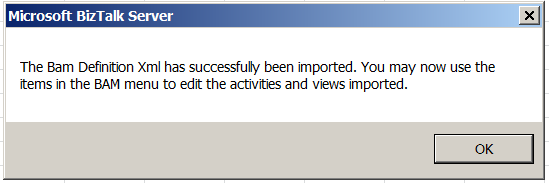
I needed to make some updates to one of the BAM Activities, so I opened up a blank Excel document and selected "Import XML..."   The BAM Activities and Views load up just fine.


However, there was one big issue that I came across.  Sadly, the PivotTable and RealTimeAggregation information did not get loaded.  If I didn't take the time to review and compare my updates with the last version of the file (we use TFS as a code repository), I would have never known that I might have pushed an incomplete BAM process (compared to the previous version) into our database.  See the new output below.


As another test, I decided to do an import and then a direct export without any modification.  Sure enough, the RealTimeAggregation and PivotTableViews within the exported XML document were missing.

To correct this, I needed to do some reverse-engineering/trial and error with creating a new PivotTable within the Excel document and re-export the XML file out.  Then I needed to compare the old XML with the new XML to make sure I had the PivotTables and Aggregations the same.  At this point I decided to put the Excel document into source code as well... :)

Not sure if this is a bug, an oversight, or not the intent of the Import XML feature within Excel, but I would think that one could get 'mildly' burned if the source xlsx file isn't saved to your code repository.

Thursday, June 4, 2015

BizTalk HTTP Adapter has NOT been deprecated

There are many out in the BizTalk community that would state that the HTTP adapter has been deprecated in the more recent versions of BizTalk (i.e. BizTalk 2009, 2010, 2013).  This is likely due to the WCF adapter offerings that Microsoft has pushed out with those versions of BizTalk.

Microsoft has several postings which document deprecated adapters:


None of the above Microsoft links discuss HTTP.  I would suspect that there is some confusion because the SOAP adapter is indeed deprecated.

That being the case, I decided to open a ticket with Microsoft Support and get the story directly from Microsoft.  Here's the reply:

Hello Bruce,

Thank you for contacting Microsoft Support. My name is Nikhil Jain.  I am the Support Professional who will be working with you on this Service Request. You may reach me using the contact information listed below, referencing the SR number (xxxxxxxxxxx).
Regarding your query I would like to inform you that Microsoft never deprecated HTTP adapter. We still support it. It is the SOAP adapter which is deprecated not the HTTP. I tried calling you @ +1 (xxx)xxx-xxxx however reached voice mail.
If you have any questions or concerns, please let me know.

Thanks and Regards
Nikhil Jain| Support Engineer | Microsoft Developer Support | BizTalk Server, WFM and MSMQ

So this puts the question to bed.  The legacy HTTP adapter is still supported and is NOT deprecated.

Although it does make sense to migrate to WCF, there isn't a need to rush the migration from HTTP to WCF as some would think.

Friday, October 10, 2014

Capturing BizTalk Perfmon Values with PowerShell - Part 1

A couple of posts ago I commented on the recently released BizTalk Health Monitor snap-in that comes with BizTalk 2013.  Remember, this can be installed on just about any version of BizTalk.  It's nice to see some common BizTalk tools being integrated into the BizTalk Administration Console.

One of the things leadership tends to ask I.T. is what kind of value is BizTalk bringing to the company.  In my case, of course, the business leadership is asking: how many, how often, when, etc.

In my case, I've been tasked to do a few things:  determine what kind of load we have on the BizTalk servers.  A couple of reasons why:
  1. Throughput/load.  Management wants to understand "do we have a 'right-sized' environment?"  Keep in mind that Microsoft overhauled their licensing model not too long ago.  Instead of license per CPU, you now are being charged by the core.  This may cause a huge jump in licensing costs.  If BizTalk is constantly under 10% utilization, it may make sense to downsize the environment (by core, at least).  Or, in a worse-case scenario, show how much is really going through BizTalk to justify scaling up your BizTalk environment further.
  2. Understand which processes, applications, ports, etc. within BizTalk are being highly taxed or under-taxed.  In our case, we 'lease' our BizTalk environment to different entities within our organization.  We need to capture data to make sure we are properly charging our internal customer/entity base.
One of the things that the BizTalk Health Monitor has exposed for me are the NUMEROUS Instances that are available.

Also, within each Instance is the actual Counter you may want to monitor.


So knowing and understanding what counters exist is great, but viewing the BTHM Performance counters is a bit inefficient and really only gives you a general snapshot of about (default) 100 seconds .  Why not capture some performance counters and store it somewhere, either as a file or directly into a database?
Side Note: Light reading for those who are interested in documentation on some of these counters.
I recently came across the very excellent PowerShell extension SQLPSX on CodePlex.  All I can say is that the contributors here have done many people a huge favor with these modules.  In this particular case, Laerte Junior really deserves kudos.  I came across his Gathering Perfmon Data with PowerShell post, which led me to the CodePlex site.  Most of this entry follows Laerte's blog to the 'T'.  Credit also goes to Allen White, as one of his posts kicked this whole thing off.  I try to give credit where credit is due.  :)
Note: You will likely need to force PowerShell version 2 for the extensions to work.
Moving on.  You can either install SQLPSX or just copy the psm1 module to your environment.  For me, I just copied the module over and used the Import-Module command.

I wanted a quick list of ALL BizTalk counters and save them to a file.  Easy to do:

Opening the text file shows a rather comprehensive list.

Taking that one step further, I can now create an XML configuration file by using the command

And the results:

Warning: Before one gets too crazy here, make sure you either pair down the configuration file or add some extra filters to the PowerShell command when you generate a config file.  Please be selective with what you really want to monitor.

With that out of the way, we now can go to the next step (and the next blog) - gathering BizTalk performance data.