Showing posts with label BizTalk. Show all posts

Thursday, August 17, 2017

Cannot delete a send handler that is used by a send port

We had a mislabeled Host/Host Instance name in one of our lower environments - it wasn't the same name as our production or qa environments, and a request was sent to rename it. So, a colleague performed the following:

  1. Create a new Host and Host Instance with the desired name.  
  2. Once that was done, add the Host to the appropriate adapter. For us it was adding it to the FILE adapter.
  3. Then re-configure all appropriate send ports to use the new Host Instance.

Restart Host Instances, and the send ports were properly using the newly created Hosts.

Once that was done, the thought was that the old host could be deleted. We came across a few things (some are obvious, others aren't so):

  1. You need to remove the Host Name from all adapters using the (old) Host you wish to remove:

At this point, an error popped up - "Cannot delete a send handler that is used by a send port":


The issue is that, although all the static send ports were updated to use the new Handler, the dynamic send ports weren't - this isn't as obvious. Here's how to do that:
  1. In the BizTalk Admin Console, select Applications/All Artifacts/Send Ports
  2. Sort by Transport Type. Here is where you will see some that don't have the Transport Type as blank. These are your Dynamic Ports.
  3. For each Dynamic Port, open one up and, in the General tab, select 'Configure'.
  4. You will see a list of Send Handlers associated to each Adapter. You will need to make your changes in this list according to how you made your changes with your static Ports.


Once these changes are made throughout, you should be able to now remove the Handler completely, and thereby able to remove Host Instances, then the Host itself.

Further explanation here by the-one-and-only Saravana Kumar:

The "Behind the Scene" section was the eureka! moment for me. 


FYI - This was tested in BizTalk 2016.  I don't believe you can navigate the same way in BizTalk 2010.

Thursday, June 4, 2015

BizTalk HTTP Adapter has NOT been deprecated

There are many out in the BizTalk community that would state that the HTTP adapter has been deprecated in the more recent versions of BizTalk (i.e. BizTalk 2009, 2010, 2013).  This is likely due to the WCF adapter offerings that Microsoft has pushed out with those versions of BizTalk.

Microsoft has several postings which document deprecated adapters:


None of the above Microsoft links discuss HTTP.  I would suspect that there is some confusion because the SOAP adapter is indeed deprecated.

That being the case, I decided to open a ticket with Microsoft Support and get the story directly from Microsoft.  Here's the reply:

Hello Bruce,

Thank you for contacting Microsoft Support. My name is Nikhil Jain.  I am the Support Professional who will be working with you on this Service Request. You may reach me using the contact information listed below, referencing the SR number (xxxxxxxxxxx).
Regarding your query I would like to inform you that Microsoft never deprecated HTTP adapter. We still support it. It is the SOAP adapter which is deprecated not the HTTP. I tried calling you @ +1 (xxx)xxx-xxxx however reached voice mail.
If you have any questions or concerns, please let me know.

Thanks and Regards
Nikhil Jain| Support Engineer | Microsoft Developer Support | BizTalk Server, WFM and MSMQ

So this puts the question to bed.  The legacy HTTP adapter is still supported and is NOT deprecated.

Although it does make sense to migrate to WCF, there isn't a need to rush the migration from HTTP to WCF as some would think.

Friday, October 10, 2014

Capturing BizTalk Perfmon Values with PowerShell - Part 1

A couple of posts ago I commented on the recently released BizTalk Health Monitor snap-in that comes with BizTalk 2013.  Remember, this can be installed on just about any version of BizTalk.  It's nice to see some common BizTalk tools being integrated into the BizTalk Administration Console.

One of the things leadership tends to ask I.T. is what kind of value is BizTalk bringing to the company.  In my case, of course, the business leadership is asking: how many, how often, when, etc.

In my case, I've been tasked to do a few things:  determine what kind of load we have on the BizTalk servers.  A couple of reasons why:
  1. Throughput/load.  Management wants to understand "do we have a 'right-sized' environment?"  Keep in mind that Microsoft overhauled their licensing model not too long ago.  Instead of license per CPU, you now are being charged by the core.  This may cause a huge jump in licensing costs.  If BizTalk is constantly under 10% utilization, it may make sense to downsize the environment (by core, at least).  Or, in a worse-case scenario, show how much is really going through BizTalk to justify scaling up your BizTalk environment further.
  2. Understand which processes, applications, ports, etc. within BizTalk are being highly taxed or under-taxed.  In our case, we 'lease' our BizTalk environment to different entities within our organization.  We need to capture data to make sure we are properly charging our internal customer/entity base.
One of the things that the BizTalk Health Monitor has exposed for me are the NUMEROUS Instances that are available.

Also, within each Instance is the actual Counter you may want to monitor.


So knowing and understanding what counters exist is great, but viewing the BTHM Performance counters is a bit inefficient and really only gives you a general snapshot of about (default) 100 seconds .  Why not capture some performance counters and store it somewhere, either as a file or directly into a database?
Side Note: Light reading for those who are interested in documentation on some of these counters.
I recently came across the very excellent PowerShell extension SQLPSX on CodePlex.  All I can say is that the contributors here have done many people a huge favor with these modules.  In this particular case, Laerte Junior really deserves kudos.  I came across his Gathering Perfmon Data with PowerShell post, which led me to the CodePlex site.  Most of this entry follows Laerte's blog to the 'T'.  Credit also goes to Allen White, as one of his posts kicked this whole thing off.  I try to give credit where credit is due.  :)
Note: You will likely need to force PowerShell version 2 for the extensions to work.
Moving on.  You can either install SQLPSX or just copy the psm1 module to your environment.  For me, I just copied the module over and used the Import-Module command.

I wanted a quick list of ALL BizTalk counters and save them to a file.  Easy to do:

Opening the text file shows a rather comprehensive list.

Taking that one step further, I can now create an XML configuration file by using the command

And the results:

Warning: Before one gets too crazy here, make sure you either pair down the configuration file or add some extra filters to the PowerShell command when you generate a config file.  Please be selective with what you really want to monitor.

With that out of the way, we now can go to the next step (and the next blog) - gathering BizTalk performance data.

Monday, September 8, 2014

WCF-SQL Transport Component is not registered correctly

You may have come across the message "WCF-SQL Transport Component is not registered correctly" when setting up a receive location or send port in BizTalk.  Some blogs suggest re-installing the BizTalk Adapater Pack.

However, in the scenario that the company I work for, this isn't the case.

The architecture of the environment was designed to be a multi-server environment with 6 BizTalk server front-ends.  Three of the servers were built to be used as Orchestration servers, and the other three were built as Receive and Send servers.

At a high-level, this sounds acceptable (pending you are configuring these at the host level - more on that later).  

However, the 6 servers aren't built alike.  The adapter packs (among other things as well) were only installed on the Receive/Send servers.  One main reason this was done were that some third-party adapters had a per-server licensing fee (i.e. special ftp adapter), and the company wanted to keep costs down while still being compliant.  ("We aren't going to use them on the Orchestration servers, so why install them on ALL servers?").  

Unfortunately, the policy above bleeded over to other adapters as well, regardless if a licensing issue was at hand or not.  In this case, the WCF Adapter Pack was not installed across all 6 servers.  

When you open up the BizTalk Administration Console (regardless from which server you remoted to), you do see the WCF adapters which were installed.

Back to the issue at hand.  If you happen to create a send or receive port onto a server that does NOT have the adapters installed on, you will get the error.  You may think that the BT Admin Console is a database-driven configuration, and you would be correct with that assumption.  However, if you click on the OK button, BizTalk tries to verify, at a minimum, the configuration settings with the locally-installed artifacts that are needed for that type of transport.

Resolving the issue was to log onto the Receieve/Send Port servers and create the ports from those servers, rather then the Orchestration servers.  No need to install/uninstall anything.

Two takeaways from this:  
  1. It may be in your best interest to keep all servers as similar as possible and let the host instances dictate which servers run what BizTalk hosts.
  2. Even though the settings within the BizTalk Administration Console are stored in the BizTalk databases, it does indeed verify a few things to the local server.  Make sure you are logged onto the proper server.

Monday, August 4, 2014

BizTalk Health Monitor - Using Older Versions of BizTalk

BizTalk 2013 R2 was just released not long ago.  One of the new tools that comes with BizTalk 2013 R2 is the BizTalk Health Monitor:


To install:
http://blog.jeroenmaes.eu/2014/06/enable-biztalk-health-monitor-biztalk-2013-r2/

In a nutshell, the BHM incorporates:
  • Integration of the MessageBox Viewer tool
  • Performance analysis thanks to integrated PerfMon
  • Easy SQL Job Status monitoring
  • Automatic Archiving of Health reports

Finally, some consolidation of common BizTalk tools (and a few other things as well)…

If you look at the second link from above, you will notice the following:

“Note that BHM will work also with previous versions of BizTalk targeting any versions of BizTalk groups since BizTalk 2004 ;-) “

Cool…  So of course I had to try it against my BizTalk 2010 instance (using the last link for install instructions).  And... it works!

I downloaded the BizTalk 2013 R2 iso file via MSDN.

Update:  The BHM is now available as a separate download.  See http://blogs.msdn.com/b/biztalkhealthmonitor.

Friday, July 11, 2014

Reserved words in BizTalk Orchestrations - unexpected keyword

Some of you have come across the "unexpected keyword: " issue with the use of XML schemas within BizTalk, and it's fairly well posted:


This solves many things.  However, you may also find issues with parts that do not really relate to the schema itself.  See the below screenshot.


I have selected the actual xsd file within the Visual Studio Solution Explorer and took a look at the properties.  You may notice the the Namespace property of the file is BizTalk_Server_Project2.response.

This is a project-level value, as you won't see this value in the schema file itself.  So let us say we have a 'MySchemas' project and a 'MyOrchestrations' project within a BizTalk solution.  You reference the MySchemas to the MyOrchestrations.  When you compile the MySchemas, you will end up with a .NET class with the .NET namespace of the above.  You may likely now get an error when trying to build the MyOrchestrations.

Sandro Pereira eludes to the same issue in a slightly different way, but the root of the issue is the same - reserved words (whether .NET or XLANG or whatever the technology):


As always, put some thought into ensuring you have unique naming conventions within your solution.

Monday, April 7, 2014

XML Schema Deep Dive

I came across this link (http://social.technet.microsoft.com/wiki/contents/articles/19692.biztalk-server-deep-dive-in-schema-design.aspx) which does a nice job of giving a deeper overview of XML schema capability and design.

Although this comes across as BizTalk-centric, my thoughts are that the overall information is W3C compliant. This means that Microsoft, in their own way (in this case, using BizTalk as the schema editor) which does try to conform to XML standards. This is a good thing, of course.  Any tool could be used, for that matter, such as Altova's XMLSpy, to develop XML schemas (.xsd file).

I've seen many developers load in an XML document and immediately using xPath to get information.  Depending on the scenario/environment, this may lead to issues that are difficult to debug, especially when working with complex (and sometimes slightly different) XML documents.  It's much better to bring in and XML document and use it as a 'type' via a schema, rather than treating it similar to a text file with 'some extra functionality'.

Also, another site (http://www.xfront.com/BestPracticesHomepage.html) which discusses some best practices...

Friday, September 6, 2013

PowerShell for BizTalk Administration: Suspended Message Counts

Continuing on with using PowerShell to help with BizTalk administration, I'd like to focus on suspended messages.

Sometimes, one of our internal departments expects a message to come in at a particular time. There are times, however, that the message was never sent to BizTalk for processing. Either way, the "I don't see an expected message, can you see if it failed?" routine is communicated our way. Keep in mind that we already have put mechanisms in place to notify if something failed... :)

At any rate, I've developed a quick PowerShell script to see if anything indeed has suspended. This one uses SQL, and it hooks into the BizTalk MessageBox Database; make sure permissions are set accordingly. This post is rather code agnostic, but the approach is to use PowerShell to be consistent with the other scripts which our group has put in place.

The query is a common, read-only script that you may have seen elsewhere:


The next step is to do the traditional SQL routine, create the SQL connection, open it, put it into a SQL adapter, and so on.


Now you have a list of all suspended messages in a typical .NET DataSet. From there we can slice and dice the information. I like sorting and grouping everything out, and PowerShell does a fantastic job of that.


The result is a list of unique BizTalk applications in your environment with a suspended message count for each application. If there aren't any suspended messages, obviously you won't have any rows in your DataSet, and you can notify your customers that everything is operating as expected in BizTalk. ;)

Friday, August 30, 2013

PowerShell for BizTalk Administration: Is this thing on? Part 3

In Part 2 I outlined getting the status of BizTalk artifacts (Recieve Locations, Send Ports, and Orchestrations) using PowerShell. All 3 of those use the same pattern. Validating the status of the Host Instances, however, can be done without using the Microsoft.BizTalk.ExplorerOM.

Looking at the Host Instances (not Hosts) at a high level, they are nothing more than a Windows Service on a server. So two ways to get information on a service via PowerShell is use use either the Win32_Process or Win32_Service objects using the PowerShell Get-WMIObject command. However, there is a unique WMI object specifically for BizTalk: MSBTS_HostInstance. I chose the last one for my script.  This does assume you have this class installed on the server you are making the call from.

Instantiating the object is a one-liner (no need to establish the SQL Server, as in the previous post).  At that point you can loop through each host instance and get the state of the Host Instances.


Wednesday, August 14, 2013

PowerShell for BizTalk Administration: Is this thing on? Part 2

In Part 1, the story is set up that we may need to get some information on BizTalk in a quick, detailed way.  We could certainly use the BizTalk Administration console, but I'd have to remote in to the server.  Our security model makes that a little difficult.

So the first thing I'd like to check are the Receive Locations and the Send Ports.  I want to create this in a script so I can run this at-will.  There are a few ways to do this: NotePad being the most basic, or we could download the PowerShell ISE.  But my favorite is SAPIEN PowerShell Studio.  I'm still trying to figure out why Microsoft hasn't tightly integrated this kind of functionality to Visual Studio.

So back to the scenario.  The object to use in both cases is the Microsoft.BizTalk.ExplorerOM.BtsCatalogExplorer:

You may notice the hard way that this object is a 32-bit only object.  So, if you are running in a 64-bit mode of PowerShell, your script won't run.  You will need to force 32-bit mode.  This can be done with the following:

The above two snippets are the basis of setting up both Receive Locations and Send Ports.  I'll first focus on the Send Ports.  The first thing is to instantiate an object using the BizTalk Explorer Object Model.  Once that's done, we'll need to connect to the proper BizTalk database.  After that's done, it's a simple loop to go through each Send Port:

Receive Locations are nested one level deeper than Send Ports, otherwise they are essentially the same process.

And (surprise, surprise) the Orchestration model is very similar as well.
And that's it.  Nothing incredibly complicated.  Obviously you'll want to code additional functionality (write out to a log file, for example) to tailor to your specific needs.  As a side note, a wonderful tool which helped me discover most BizTalk WMI objects is the PowerShell WMI Explorer.

Part 3 will cover Host Instances.

Tuesday, June 11, 2013

PowerShell for BizTalk Administration: Is this thing on? Part 1

I've been heavily involved with BizTalk administration - making sure our environment is healthy and keeping pace with processing well over 1,000 messages/second (yes, that much and more).  This is all done between 40+ applications, which uses hundreds of recieve ports, send ports, orchestrations, host instances, etc.  Our BizTalk environment pulls this off without a sweat.

There are times, however, when we need a quick response to "is this thing on?"  I've found, like many others, that using WMI calls and the Microsoft.BizTalk.ExplorerOM.BtsCatalogExplorer class within Powershell is mighty, mighty powerful (and easy)!  Placing these calls into PowerShell scripts are a quick, convenient way to find those answers.

As a highlight, the initial tasks are to verify the status (i.e. running/started) of the following BizTalk artifacts:
  1. Receive Ports
  2. Send Ports
  3. Orchestrations
  4. Host Instances
You could certainly make a call to get Application status (running, partial, stopped), but you'll find quickly that the above list goes into greater detail.  There are many cases where a particular send port may have stopped, and we may want to know that sooner than later.

Furthermore, it would be nice to get a quick view of suspended messages.  Later on, we'll discuss how to validate other artifacts outside of BizTalk (i.e. IIS) which are closely hooked into BizTalk.

We'll get into the Ports in Part 2.

Thursday, January 24, 2013

Failed to Update Binding Information

Sometimes you may come across the error "Failed to update binding information" when trying to import bindings for a BizTalk application.


Your bindings may indeed be correct, and you likely also have the proper Host created (you checked THREE times already!).  However, you may not have added the host within the BizTalk Adapters.


This is especially common when building a new BizTalk server or have a BizTalk application which will be using a new Host.

Wednesday, June 13, 2012

enableBizTalkCompatibilityMode in SAP adapter bindings

I've installed the BizTalk SAP adapter (more specifically, the WCF LOB Adapter SDK) to my development box and have successfully connected to our test SAP environment.

Within Visual Studio, I created a new BizTalk solution, used the Consume Adapter Service, and selected the sapBinding option. I went through the process of configuring the connection string, credentials, contract type, and, in this case, which IDoc was needed to create the schemas and binding information.

It all works wonderfully well. Two things, however, make me scratch my head a little bit.

First, the binding xml file (you could import this at the application level within the Administration Console) which is created by the wizard assumes you will be using the WCF-Custom transport type instead of WCF-SAP. This isn't really that big of a deal, more of a curiosity, since the configurations are essentially the same, just displayed a bit differently.

Second, the binding file has the binding configuration/property enableBizTalkCompatibilityMode set to false. When I mouse-over this property when selecting the WCF-SAP transport, I get this:


Set to True when used within BizTalk. Set to False otherwise.


So why doesn't the wizard set this to True in the first place?

To be honest, I'm not sure what this property does, as the documentation for it is a bit light.

I'll keep you posted as I come across new findings.

Tuesday, December 20, 2011

BizTalk's Table Looping Functiod in detail

There are several posts based on the Table Looping Functiod:

These are all great examples, but I'd like to get into detail of what may happens when using flatlander's example without using the BizTalk .NET Stew example.

I'm going to copy flatlander's example. My source file looks like this:

Take note that I have 3 Chef nodes, but only 1 MaitreD node.

Testing the map produces the below output:


Notice that I have 3(?!) MaitreD instances of Mr. Cook. That isn't right. My initial suspicions are that you will iterate both the same time as the node which has the highest number of iterations. So if node Chef has 3 iterations (child nodes), you will have the same iterations in your output with your MaitreD nodes.

Not quite what I want.

So, going on, I'm following what BizTalk and .NET Stew explains, by using the gated functionality of the functoid. The question becomes now: How do I gate the input if I only have fewer iterations of one node vs. the other?

Being that the two root nodes in the source are iterative, I can determine which iteration I am on from the source. Taking that one step further, I can also determine if a particular iteration of a node is not null. The assumption is that the node you are comparing cannot be null.

So in this exercise, let's take the Chef/Name and MaitreD/Name as the 'gate' nodes to compare, since I have determined they cannot be null or empty. If a node at a particular index doesn't exist (i.e. Chef/Name[20]), then it will be blank/null. I pipe the 'value' of that index to a NotEqual functoid. I compare it to an empty string, and from there I should have a boolean value which determines if that index of the node exists - my gate.


Let's take a look into the functoid's configurations.
Index:


And NotEqual. The string value is empty (no spaces).


I use these two outputs as column1 of the Table Looping functiod. Also note that I have the Gated checkbox checked, as in BizTalk and .NET Stew explains:


Testing the map, and you have a cleaner representation of the output:


This may not be the most elegant solution, but in this scenario we are using only functiods in the map and staying away from XSLT, scripting, or an external assembly - as many have suggested to do instead.

I personally lean towards the approach that if it's not too difficult, stay within a single pattern or two for supportablity within your development environment.

Tuesday, September 13, 2011

BizTalk Inline XSLT Call Template and Namespaces

If you have used the Inline XSLT Call Template at all, you will notice at times that your map will validate just fine, but the output may not be exactly what you want (sometimes just an empty single node).

A little gotcha is that you need to be aware of the namespaces within your schemas, or the output of your map will be less than desirable.

Let's take a simple scenario. I'm mapping one source schema to a single destination schema.


In this example, I'm trying to iterate through a node and essentially pass the input parameter through:


Unfortunately my output looks a little small:


Interesting. Not a single error, but not what I was expecting.

The problem here is that with my XSLT code, I overlooked the namespace of my source schema. To get the proper namespace, I save the latest version of my map, validate it,


...and then take a look at the output XSL file. The location of this file is displayed in the output window.


Within the .xsl file, I will now be able to get the proper namespace of my schema,


In this case, the namespace is s0, as in s{zero}. Now I can apply this to my XSTL Call functoid.


A subtle difference, with drastic results:

Thursday, February 10, 2011

BizTalk XML Schema - Invalid type name

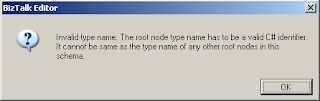
In many cases when developing a BizTalk app in Visual Studio, you'll get an existing schema from some other sytem/source. When validating it, you may get an error "Invalid type name." as shown below.


Just recently, I've come across this. Double-click on the error within the Error List box and Visual Studio should take you to the offending record within the schema pane.

From there, take a look at the properties window, and you will see something similar to the below image.


When you build a BizTalk solution, the schema compiles a into C# object. The .Net framework doesn't allow the "-" within TypeNames because the "-" is reserved.

The solution is to change the RootNode Typename to have something other than a "-". In my case, I changed the "-" to an underscore "_".

You need to leave the Node Name alone, since this part is what will validate the schema against the actual XML document.


Wednesday, November 10, 2010

Registering multiple adapter types within the same process is not a supported configuration

I was getting an error in our BizTalk 2009 development box:


The Messaging Engine failed to register an adapter "WCF-WSHttp". Details: "Registering multiple adapter types within the same process is not a supported configuration. For e.g. HTTP and SOAP receive adapters cannot co-exist in the same process"


What seemed to be the issue was that different BizTalk Transport Types (one being WCF-WSHttp and the other being WCF-BasicHttp) were being associated to the same IIS App Pool. Creating a new App Pool for a particular Transport Type (or properly re-assigning the web-site's App Pool designation) should do the trick.

Make sure when you set up your BizTalk web apps (web sites in IIS) that you separate your App Pools based on your BizTalk Transport Types properly.

Wednesday, June 9, 2010

BAM WebServices authentication

I'd like to expand on Tiho's excellent post. I was having the same issues he came across.

One of the things that I did was to use the identity (credentials) from the BAM app pool configuration within Computer Management console and used that as the owner of the database.


use BAMPrimaryImport
go
sp_changedbowner 'domain\user' -- Identity from BAM app pool
go


Also, depending on how you installed BizTalk, you may get your own user account (or more exact, the individual who installed BizTalk) set as owner for all BizTalk databases, which was also the case for me. Those databases outside of BAMPrimaryImport should be set to sa.

At that point, you can use the BM.exe command line to add the proper accounts to each view, as stated on Microsoft's site. In this case, I added the BizTalk Administrator group for each view. You can expand on that on a case by case scenario.

Bruce


Friday, February 26, 2010

BizTalk 2009 and SQL Server Database Aliases

We are in the middle of installing BizTalk 2009 at my current company. Our database guru decided that all future databases would use database CNames, making the databases a little more flexible if future changes are needed. Flexibility is always a good thing.

A bit of background:


  1. We have a clustered SQL Server 2008 environment (Active/Passive failover) that BizTalk is using.

  2. We are installing most of the BizTalk install options.

  3. We are installing UDDI 3.0 and ESB 2.0 as well (LOTS of blog material on these two to come).

Unfortunately, we ran into problems with the BizTalk Server Configuration tool, as it's not consistent with itself. The Enterprise SSO and BizTalk Rules Engine configurations accept the CName just fine. However, the Group and BAM Tools don't recognize the CName at all... Maybe there were different developers between these sections?

Our database admin came up with another idea: use an alias in the SQL Server Configuration Manager, as shown below. We acknowledge that it wasn't the best solution, but it does allow us to have a single place where we can change the database name if needed.


That worked just fine for the BizTalk Configuration itself.


However, we ran into problems with this with the UDDI and ESB installs. Neither CNames nor Aliases worked - we had to put in the actual SQL Server name!


If anything, it's VERY inconsistent at best. Hopefully Microsoft will recognize this and make changes so that all setups/installers are consistent with each other.


There's also some more entries from Andy Morrison, who is helping me with the install.

Tuesday, January 26, 2010

BizTalk 2009 BAM Installation Frustration - SSIS jobs installed in wrong location with named database instances

I’m currently installing BizTalk 2009 where I work. The BizTalk database is on a separate physical clustered server – and the database we are installing BizTalk on has its own instance name.

This leads to problems when installing BAM – in particular the SSIS packages.

Background: SSIS does not install on instances – meaning it is installed at the root of the SQL Server servername structure. Therefore, if you install the BizTalk databases on its own SQL instance (servername\biztalk for example), you won’t see the BAM SSIS packages.

The problem is that SSIS doesn’t recognize instances, so you get an error much like below if you try:


The BizTalk 2009 installer doesn’t give you the option to configure the locations for these, so there's no way to fix this up front.

The packages DO get installed to SQL Server, but to the folder structure of the database instance rather than the root servername. If you log onto Integration Services using your root servername, you will get in, BUT you won’t see the SSIS packages.

The solution is to manually(!) migrate the packages to the proper (folder) instance – the root servername (not the instance), as shown below:


You may need to verify/validate the connection strings of the packages – I don’t think there were any changes, but you may want to do this to be safe.