Showing posts with label SQL. Show all posts

Wednesday, April 20, 2016

Side by side SQL versions, Entity Framework, and SQL Aliases

My laptop has both SQL Server 2008 and SQL Server 2012 installed for development purposes.  The SQL Server 2008 is at the root instance (local) and the 2012 version is installed has its own instance (local)\SQL2012.

I have been developing an application which has an app.config file with a SQL Server connection string (code first Entity Framework).  Since the solution I'm working on it in source control (TFS), it's shared; so I decided to make an alias for use in the connection string.  That way, others developing on this project can use their own local database without changing the configuration file (and then checking their connection string changes back in and irritating the rest of the dev group).  The alias that I created for my local laptop points to the SQL 2012 instance.

I opened up SQL Server Configuration Manager and created an alias to my 2012 instance (.\SQL2012).  However, when the update-database command is executed, the database was deployed to the root instance (SQL 2008), and not the 2012 instance that I wanted it deployed to (as identified in my SQL Alias).  I restarted the SQL Server service, but still got the same result when I called the update-database command again.

What I didn't realized is that I was using the SQL Server 2008 version of SQL Server Configuration Manager, not the 2012 version.  The 2008 version won't show the 2012 services but 2012 version will show all services.

To better explain, this screenshot is what I see when I run the 2008 version:
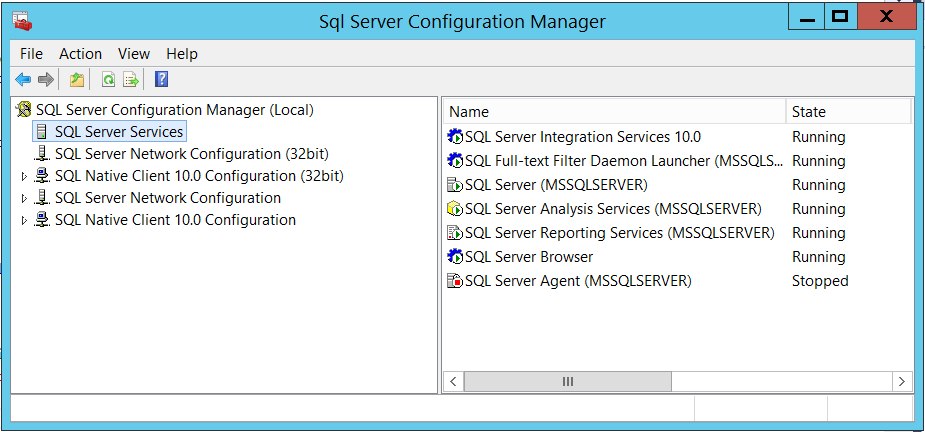

and this is the screenshot from the 2012 version:


Notice that 2012 version displays the SQL Server 2012 instance of the services.  Because I was using the 2008 version of the Configuration manager, I was unknowingly restarting the root server (2008) service, not the 2012 service.

After I restarted the 2012 instance, all worked just fine.

As far as Entity Framework is concerned, it seems to me that should expect an error that an instance can't be found when using the update-datebase command.  It would have been nice to see an error at a minimum (i.e. "Cannot find SQL instance, defaulting to root").

See https://msdn.microsoft.com/en-us/library/ms174212.aspx for exact locations of the specific version of SQL Server Configuration Manager.

Friday, September 6, 2013

PowerShell for BizTalk Administration: Suspended Message Counts

Continuing on with using PowerShell to help with BizTalk administration, I'd like to focus on suspended messages.

Sometimes, one of our internal departments expects a message to come in at a particular time. There are times, however, that the message was never sent to BizTalk for processing. Either way, the "I don't see an expected message, can you see if it failed?" routine is communicated our way. Keep in mind that we already have put mechanisms in place to notify if something failed... :)

At any rate, I've developed a quick PowerShell script to see if anything indeed has suspended. This one uses SQL, and it hooks into the BizTalk MessageBox Database; make sure permissions are set accordingly. This post is rather code agnostic, but the approach is to use PowerShell to be consistent with the other scripts which our group has put in place.

The query is a common, read-only script that you may have seen elsewhere:


The next step is to do the traditional SQL routine, create the SQL connection, open it, put it into a SQL adapter, and so on.


Now you have a list of all suspended messages in a typical .NET DataSet. From there we can slice and dice the information. I like sorting and grouping everything out, and PowerShell does a fantastic job of that.


The result is a list of unique BizTalk applications in your environment with a suspended message count for each application. If there aren't any suspended messages, obviously you won't have any rows in your DataSet, and you can notify your customers that everything is operating as expected in BizTalk. ;)