I'm an administrator of an FTP server (on Windows Server 2008R2) which has a well-known FTP client on it. We use SSH and SSL, depending on our partners. Most of the time we use scheduled tasks to trigger FTP scripts. I've been noticing within the Windows Task Scheduler that tasks aren't completing, and are always in a 'running' state.
Typically I use my account to log in and make changes. However, I use a different local adminstrator account to execute the scheduled tasks. I have found out that this is bad practice.
In my case, when using SSL, SSH, (and I *think* PGP), the keys are saved somewhere within the C:\Users\{username}\AppData folder. I believe this is a common practice throughout the industry - not sure if this is a Microsoft policy.
So when you log in using a different username to set up the environment and use a different username to execute the task, your results aren't as anticipated. This is likely due to the fact that the keys you saved/accepted are NOT in the proper user folder.
I logged into the server using the same credentials as the scheduled task, accepted the certs, and all has been working well since.
Monday, December 19, 2011

Tuesday, September 13, 2011
BizTalk Inline XSLT Call Template and Namespaces
If you have used the Inline XSLT Call Template at all, you will notice at times that your map will validate just fine, but the output may not be exactly what you want (sometimes just an empty single node).
A little gotcha is that you need to be aware of the namespaces within your schemas, or the output of your map will be less than desirable.
Let's take a simple scenario. I'm mapping one source schema to a single destination schema.

In this example, I'm trying to iterate through a node and essentially pass the input parameter through:

Unfortunately my output looks a little small:

Interesting. Not a single error, but not what I was expecting.
The problem here is that with my XSLT code, I overlooked the namespace of my source schema. To get the proper namespace, I save the latest version of my map, validate it,

...and then take a look at the output XSL file. The location of this file is displayed in the output window.

Within the .xsl file, I will now be able to get the proper namespace of my schema,

In this case, the namespace is s0, as in s{zero}. Now I can apply this to my XSTL Call functoid.

A subtle difference, with drastic results:

A little gotcha is that you need to be aware of the namespaces within your schemas, or the output of your map will be less than desirable.
Let's take a simple scenario. I'm mapping one source schema to a single destination schema.

In this example, I'm trying to iterate through a node and essentially pass the input parameter through:

Unfortunately my output looks a little small:

Interesting. Not a single error, but not what I was expecting.
The problem here is that with my XSLT code, I overlooked the namespace of my source schema. To get the proper namespace, I save the latest version of my map, validate it,

...and then take a look at the output XSL file. The location of this file is displayed in the output window.

Within the .xsl file, I will now be able to get the proper namespace of my schema,

In this case, the namespace is s0, as in s{zero}. Now I can apply this to my XSTL Call functoid.

A subtle difference, with drastic results:

Wednesday, April 13, 2011
Creating Dev SharePoint 2010 Instance
I'm installing a development BizTalk 2010 environment. Part of the environment is to install a local SharePoint 2010 instance.
Like other blog postings, you'll come across using New-SPConfigurationDatabase command to create the database ad-hoc.
What you may not notice is that you need to use the SharePoint 2010 Management Shell, not the base PowerShell. It's located within the Microsoft SharePoint 2010 Products folder in the Start Menu.
Like other blog postings, you'll come across using New-SPConfigurationDatabase command to create the database ad-hoc.
What you may not notice is that you need to use the SharePoint 2010 Management Shell, not the base PowerShell. It's located within the Microsoft SharePoint 2010 Products folder in the Start Menu.
Wednesday, April 6, 2011
Microsoft Releases BizTalk 2010 Certification
The Microsoft team has now released the certification for BizTalk 2010.
The certification number is 70-595.
The certification number is 70-595.
Monday, April 4, 2011
Epsilon Notifies Clients of Unauthorized Entry into Email System
I received TWO emails yesterday about a data breach. One was from my bank, the other from a well-known technology group. Both messages comment that their vendor, Epsilon, had a security breach.
Apparently "the information that was obtained was limited to email addresses and/or customer names only"...
To me, that's very important information. Who knows, even hackers might try to send an email to someone trying to spoof my email address.
Not that I don't trust my bank with security, but I don't.
I will now probably have to spend a large amount of time sifting through spam, or even more extreme - get a new email address. I've been suggesting this to many for some time: one email for personal, and a different one for the rest of the companies -like my bank- that don't take my personal data with much regard.
Curious if a lawsuit will occur...
Apparently "the information that was obtained was limited to email addresses and/or customer names only"...
To me, that's very important information. Who knows, even hackers might try to send an email to someone trying to spoof my email address.
Not that I don't trust my bank with security, but I don't.
I will now probably have to spend a large amount of time sifting through spam, or even more extreme - get a new email address. I've been suggesting this to many for some time: one email for personal, and a different one for the rest of the companies -like my bank- that don't take my personal data with much regard.
Curious if a lawsuit will occur...
Thursday, February 10, 2011
BizTalk XML Schema - Invalid type name
In many cases when developing a BizTalk app in Visual Studio, you'll get an existing schema from some other sytem/source. When validating it, you may get an error "Invalid type name." as shown below.
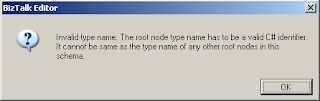
Just recently, I've come across this. Double-click on the error within the Error List box and Visual Studio should take you to the offending record within the schema pane.
From there, take a look at the properties window, and you will see something similar to the below image.

When you build a BizTalk solution, the schema compiles a into C# object. The .Net framework doesn't allow the "-" within TypeNames because the "-" is reserved.
The solution is to change the RootNode Typename to have something other than a "-". In my case, I changed the "-" to an underscore "_".
You need to leave the Node Name alone, since this part is what will validate the schema against the actual XML document.
Just recently, I've come across this. Double-click on the error within the Error List box and Visual Studio should take you to the offending record within the schema pane.
From there, take a look at the properties window, and you will see something similar to the below image.
When you build a BizTalk solution, the schema compiles a into C# object. The .Net framework doesn't allow the "-" within TypeNames because the "-" is reserved.
The solution is to change the RootNode Typename to have something other than a "-". In my case, I changed the "-" to an underscore "_".
You need to leave the Node Name alone, since this part is what will validate the schema against the actual XML document.
Thursday, December 23, 2010
VMWare Server, Windows Server 2008R2 Freezes
I am using VMWare Server 2 and have created a Windows Server 2008R2 (x64) virtual machine.
Once that was set up, I tried adding some roles to the server, only for it to appear to freeze/lockup in the verifying installation part.
No need to worry, the server itself didn't really lock up, as you can remote in to the virtual machine just fine. The real culprit here are the VMWare video drivers.
The solution is to to into the control panel and uninstall the video driver and do a reboot/restart. The caveat with this, unfortunately, is that you no longer have the nice window resizing feature that you get with the VMWare video driver.
Once that was set up, I tried adding some roles to the server, only for it to appear to freeze/lockup in the verifying installation part.
No need to worry, the server itself didn't really lock up, as you can remote in to the virtual machine just fine. The real culprit here are the VMWare video drivers.
The solution is to to into the control panel and uninstall the video driver and do a reboot/restart. The caveat with this, unfortunately, is that you no longer have the nice window resizing feature that you get with the VMWare video driver.
Subscribe to:
Posts (Atom)