I'm installing a development BizTalk 2010 environment. Part of the environment is to install a local SharePoint 2010 instance.
Like other blog postings, you'll come across using New-SPConfigurationDatabase command to create the database ad-hoc.
What you may not notice is that you need to use the SharePoint 2010 Management Shell, not the base PowerShell. It's located within the Microsoft SharePoint 2010 Products folder in the Start Menu.
Wednesday, April 13, 2011

Wednesday, April 6, 2011
Microsoft Releases BizTalk 2010 Certification
The Microsoft team has now released the certification for BizTalk 2010.
The certification number is 70-595.
The certification number is 70-595.
Monday, April 4, 2011
Epsilon Notifies Clients of Unauthorized Entry into Email System
I received TWO emails yesterday about a data breach. One was from my bank, the other from a well-known technology group. Both messages comment that their vendor, Epsilon, had a security breach.
Apparently "the information that was obtained was limited to email addresses and/or customer names only"...
To me, that's very important information. Who knows, even hackers might try to send an email to someone trying to spoof my email address.
Not that I don't trust my bank with security, but I don't.
I will now probably have to spend a large amount of time sifting through spam, or even more extreme - get a new email address. I've been suggesting this to many for some time: one email for personal, and a different one for the rest of the companies -like my bank- that don't take my personal data with much regard.
Curious if a lawsuit will occur...
Apparently "the information that was obtained was limited to email addresses and/or customer names only"...
To me, that's very important information. Who knows, even hackers might try to send an email to someone trying to spoof my email address.
Not that I don't trust my bank with security, but I don't.
I will now probably have to spend a large amount of time sifting through spam, or even more extreme - get a new email address. I've been suggesting this to many for some time: one email for personal, and a different one for the rest of the companies -like my bank- that don't take my personal data with much regard.
Curious if a lawsuit will occur...
Thursday, February 10, 2011
BizTalk XML Schema - Invalid type name
In many cases when developing a BizTalk app in Visual Studio, you'll get an existing schema from some other sytem/source. When validating it, you may get an error "Invalid type name." as shown below.
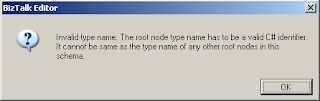
Just recently, I've come across this. Double-click on the error within the Error List box and Visual Studio should take you to the offending record within the schema pane.
From there, take a look at the properties window, and you will see something similar to the below image.

When you build a BizTalk solution, the schema compiles a into C# object. The .Net framework doesn't allow the "-" within TypeNames because the "-" is reserved.
The solution is to change the RootNode Typename to have something other than a "-". In my case, I changed the "-" to an underscore "_".
You need to leave the Node Name alone, since this part is what will validate the schema against the actual XML document.
Just recently, I've come across this. Double-click on the error within the Error List box and Visual Studio should take you to the offending record within the schema pane.
From there, take a look at the properties window, and you will see something similar to the below image.
When you build a BizTalk solution, the schema compiles a into C# object. The .Net framework doesn't allow the "-" within TypeNames because the "-" is reserved.
The solution is to change the RootNode Typename to have something other than a "-". In my case, I changed the "-" to an underscore "_".
You need to leave the Node Name alone, since this part is what will validate the schema against the actual XML document.
Thursday, December 23, 2010
VMWare Server, Windows Server 2008R2 Freezes
I am using VMWare Server 2 and have created a Windows Server 2008R2 (x64) virtual machine.
Once that was set up, I tried adding some roles to the server, only for it to appear to freeze/lockup in the verifying installation part.
No need to worry, the server itself didn't really lock up, as you can remote in to the virtual machine just fine. The real culprit here are the VMWare video drivers.
The solution is to to into the control panel and uninstall the video driver and do a reboot/restart. The caveat with this, unfortunately, is that you no longer have the nice window resizing feature that you get with the VMWare video driver.
Once that was set up, I tried adding some roles to the server, only for it to appear to freeze/lockup in the verifying installation part.
No need to worry, the server itself didn't really lock up, as you can remote in to the virtual machine just fine. The real culprit here are the VMWare video drivers.
The solution is to to into the control panel and uninstall the video driver and do a reboot/restart. The caveat with this, unfortunately, is that you no longer have the nice window resizing feature that you get with the VMWare video driver.
Wednesday, November 10, 2010
Registering multiple adapter types within the same process is not a supported configuration
I was getting an error in our BizTalk 2009 development box:
The Messaging Engine failed to register an adapter "WCF-WSHttp". Details: "Registering multiple adapter types within the same process is not a supported configuration. For e.g. HTTP and SOAP receive adapters cannot co-exist in the same process"
What seemed to be the issue was that different BizTalk Transport Types (one being WCF-WSHttp and the other being WCF-BasicHttp) were being associated to the same IIS App Pool. Creating a new App Pool for a particular Transport Type (or properly re-assigning the web-site's App Pool designation) should do the trick.
Make sure when you set up your BizTalk web apps (web sites in IIS) that you separate your App Pools based on your BizTalk Transport Types properly.
The Messaging Engine failed to register an adapter "WCF-WSHttp". Details: "Registering multiple adapter types within the same process is not a supported configuration. For e.g. HTTP and SOAP receive adapters cannot co-exist in the same process"
What seemed to be the issue was that different BizTalk Transport Types (one being WCF-WSHttp and the other being WCF-BasicHttp) were being associated to the same IIS App Pool. Creating a new App Pool for a particular Transport Type (or properly re-assigning the web-site's App Pool designation) should do the trick.
Make sure when you set up your BizTalk web apps (web sites in IIS) that you separate your App Pools based on your BizTalk Transport Types properly.
Wednesday, June 9, 2010
BAM WebServices authentication
I'd like to expand on Tiho's excellent post. I was having the same issues he came across.
One of the things that I did was to use the identity (credentials) from the BAM app pool configuration within Computer Management console and used that as the owner of the database.
One of the things that I did was to use the identity (credentials) from the BAM app pool configuration within Computer Management console and used that as the owner of the database.

use BAMPrimaryImport
go
sp_changedbowner 'domain\user' -- Identity from BAM app pool
go
Also, depending on how you installed BizTalk, you may get your own user account (or more exact, the individual who installed BizTalk) set as owner for all BizTalk databases, which was also the case for me. Those databases outside of BAMPrimaryImport should be set to sa.
At that point, you can use the BM.exe command line to add the proper accounts to each view, as stated on Microsoft's site. In this case, I added the BizTalk Administrator group for each view. You can expand on that on a case by case scenario.
Bruce
Subscribe to:
Posts (Atom)